Showing posts with label information gathering. Show all posts

Sunday, February 12, 2012

httprint

Information Gathering -> Network Analysis -> Service fingerprinting -> httprint

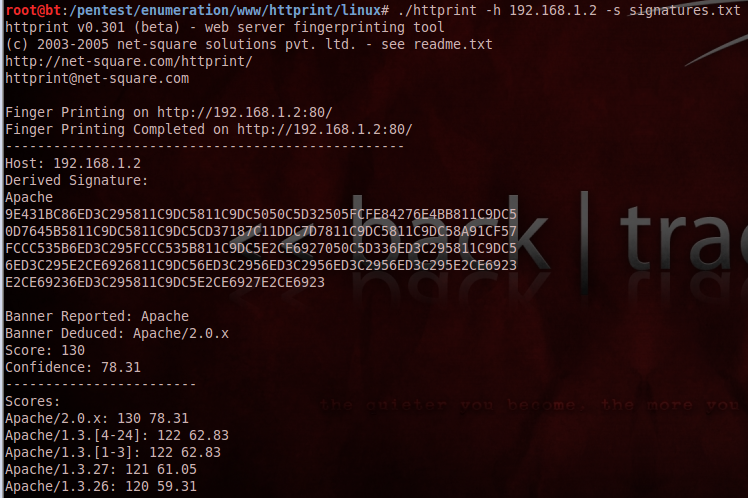
This tool can also identify webservers with cheking fingerprints. It compares the gathered data with its fingerprint database, and assigns a probability to the server type, and it lists them in descending order. The app has a GUI version as well.

Usage of the command line version:
Folder:
/pentest/enumeration/www/httprint/linux#

Examples:
./httprint -h 192.168.1.2 -s signatures.txt
./httprint -h 192.168.1.2 -P0 -s signatures.txt <- turn off ping
./httprint -h 192.168.1.2 -P0 -s signatures.txt -o results.html <- print the output to file


Official website: http://net-square.com/httprint/

Saturday, February 11, 2012

httsquash

Information Gathering -> Network Analysis -> Service fingerprinting -> httsquash

Httsquash is a http scanner, banner grabber and data retriever. It can scan large IP ranges for webservers. It supports IPv6, various HTTP requests and fingerprints based on httrecon signatures.

Official website: http://complemento.sourceforge.net/

Usage:

./httsquash -r [IP address range]

Example:

./httsquash -r 192.168.1.1

Wednesday, January 18, 2012

amap

Information Gathering -> Network Analysis -> Service fingerprinting -> amap

amap is good for detecting applications / services on a given port. We can reveal the app name and even its version number. It works by sending a trigger message to the port, and compares it's database with the response.

The location of the amap trigger files and response database in BackTrack5:
/usr/local/etc/appdefs.trig
/usr/local/etc/appdefs.resp

Example:

root@bt:~# amap <- prints the available options

root@bt:~# amap -b 192.168.1.11 21 <- examining port 21, with printing the banner

root@bt:~# amap -bq 192.168.1.11 21 80 <- scanning port 21, 80, prints banner, but if a port is closed it doesn't give any information about that. If we want to scan multiple ports we need to list them with a space delimiter.


Official website: http://thc.org/thc-amap/

Tuesday, December 6, 2011

xprobe2

Information Gathering -> Network Analysis -> OS fingerprinting -> xprobe2

While p0f does passive OS fingerprinting, xprobe2 does active. It tries to find the OS type with multiple approaches, like fuzzy signature matching, probabilistic guesses, multiple matches simultaneously, and a signature database. These mainly focus on network protocols like ICMP, TCP and UDP. Beside that it's capable to do port scanning as well.

It has quite a few options, but it's quite easy to run with the default settings:

root@bt:~# xprobe2 192.168.1.11


It's not really accurate, but probably because its database is not up-to-date.

p0f

Information Gathering -> Network Analysis -> OS fingerprinting -> p0f

p0f = Passive OS Fingerprinting

p0f is capable to identify OS fingerprints in passive mode. It does it by sniffing and analyzing TCP packets, so in case we connect somewhere, or someone else connects to us, it can listen to the traffic passively, and doesn't generate any traffic. It can detect OSes in the following ways:
- SYN mode (who connects to us) - this is the default
- SYN + ACK mode - where we connect to
- RST+ mode - where we can't connect
- those whose traffic we see

The default fingerprint database can be found in the /etc/p0f/ folder.

Examples:

root@bt:~# p0f -h <- help
root@bt:~# p0f -i eth1 <- listen on eth1 interface
root@bt:~# p0f -i eth1 -A <- SYN ACK mode
root@bt:~# p0f -i eth1 -A -l -t <- one line output and timestamp

For me it didn't really worked out, no matter what I visited.


Official website: http://lcamtuf.coredump.cx/p0f.shtml

Thursday, May 12, 2011

zenmap

Information Gathering -> Network Analysis -> Identify Live Hosts -> zenmap

zenmap is a GUI interface for nmap. We have several options:

1. We can select from predefined profiles (profile - given parameter settings for nmap)
2. We create our own profile
3. We enter the nmap command itself
The output and and the summary will be in the main window, and on the left side we will see the hosts and services, which were found.


Official website: http://nmap.org/zenmap/


Wednesday, May 11, 2011

reverseraider

Information Gathering -> Network Analysis -> DNS Analysis -> reverseraider

This is another DNS domain search tool, which uses brute force method. We can search based on IPv4 and IPv6 ranges as well instead of domains. It has 3 different length wordlists, or we can use our own. We can choose to use TCP queries instead of UDP.

Official website: http://complemento.sourceforge.net/

dnsdict6

Information Gathering -> Network Analysis -> DNS Analysis -> dnsdict6

This program is looking for DNS domain names, and it attempts to resolve their IPv6 addresses with brute force method. You can also create your own word list or use its own, which currently contains 3,001 words. It can run maximum 32 threads to perform queries.

The utility is part of a complete IPv6 testing toolset, which can be found here:
http://www.thc.org/thc-ipv6/

Monday, April 25, 2011

dnsenum

Information Gathering > DNS > dnsenum


This will be the last tool in the information gathering topic. I won't deal with Dradis and Paterva Maltego for now. This is an all-in-one software, and capable for the following:

1) Retrieves the IP address of the host (A record)
2) Get NS records
3) Get MX records
4) Zone transfer
5) Search for subdomains with Google
6) Search for subdomains based on a list
7) Class C IP calculation and whois query
8) Reverse lookup IP address ranges


An example:

fierce

Information Gathering > DNS > fierce


This is a very useful tool with a pretty good algorithm. In short how it works:

After our DNS server it jumps to the target domain's, and continue query that one. Thus, the private IP address ranges can also be detected if the target uses the same server for internal and external IP's resolution. Then retrieves the SOA record and tries to make a zone transfer (this is usually not successful). Then looks for subdomain based on a list, but you can specify your own. If it finds an address that resolves to an IP, will try to resolve the surrounding IP addresses as well (the range is adjustable).

In addition, there are plenty of options. Here is an example (the result does not seen till the end, because it's rather long):


Official website: http://ha.ckers.org/fierce/

Sunday, April 24, 2011

dnsrecon

Information Gathering > DNS > dnsrecon

This is an all-in-one tool, we can do lots of DNS related tasks with it:
  1. Do a reverse lookup query for an IP range
  2. Search for the top level domain of a given domain
  3. sub domain search based on a list
  4. Query MX, SOA, NS records
  5. Zone transfer for the given NS records
  6. SRV record enumeration

An example:

Saturday, April 23, 2011

dnstracer

Information Gathering > DNS > dnstracer

The tool is for finding which DNS server resolves a specific domain. It sends a non-recursive query to the DNS server, and based on the answer it makes additional queries. Here is a very good article about the process:

http://technet.microsoft.com/en-us/library/cc775637%28WS.10%29.aspx

In summary, the client makes a DNS query to its own server, and if it doesn't know the answer it returns a list of servers, which might be able resolve the request. Then the app will query those servers, and so on till it gets the answer, we even could reach the root server. Running is finished, when all DNS servers were queried.

If we use the "-v" option it will print the DNS packets as well.

Here is an example:


Official website: http://www.mavetju.org/unix/dnstracer.php

Sunday, April 17, 2011

dnsmap-bulk

Information Gathering > DNS > dnsmap-bulk

This is a small script, which runs  dnsmap to multiple domains at the same time.


If you got the following message: "./dnsmap-bulk.sh: line 17: dnsmap: command not found" then open the script and change "dnsmap" to "./dnsmap".

Friday, April 15, 2011

dnsmap

Information Gathering > DNS > dnsmap

This is basically a brute force program, which performs a DNS lookups on the domain based on the provided wordlist. Thus, we can find non-public domain names (with IP of course), dynamic entries, or anything. Really depends on how good our word list is. We can use the built-in list of the tool or our own. The result can be saved in a plain TXT or CSV files.


Official website: http://code.google.com/p/dnsmap/

Friday, April 8, 2011

dnswalk

Information Gathering > DNS > dnswalk

Before I jump into, I have to admit, that I'm not expert in DNS. This tool can do DNS zone transfers. This means that we can request, and download the whole DNS database of a domain to our machine. Of course this doesn't work in most the cases, cause it usually not permitted on the server, however it's really a legit DNS function. Other than that it also runs a couple of consistency checks.

Usage: dnswalk domain
domain MUST end with a '.'
root@bt:/pentest/enumeration/dns/dnswalk# ./dnswalk --help
./dnswalk version [unknown] calling Getopt::Std::getopts (version 1.05 [paranoid]),
running under Perl version 5.10.0.

Usage: dnswalk [-OPTIONS [-MORE_OPTIONS]] [--] [PROGRAM_ARG1 ...]

The following single-character options are accepted:
        With arguments: -D
        Boolean (without arguments): -r -f -i -a -d -m -F -l

Options may be merged together.  -- stops processing of options.
Space is not required between options and their arguments.
  [Now continuing due to backward compatibility and excessive paranoia.
   See ``perldoc Getopt::Std'' about $Getopt::Std::STANDARD_HELP_VERSION.]
Usage: dnswalk domain
domain MUST end with a '.'
root@bt:/pentest/enumeration/dns/dnswalk#

Its help is not too informative regarding the options, but we can find a pretty good article about them here:

http://www.aldeid.com/index.php/Dnswalk

Wednesday, April 6, 2011

lbd

Information Gathering > DNS > lbd

This is a very simple utility. It checks whether a domain uses load balancer or not.


lbd - load balancing detector 0.1 - Checks if a given domain uses load-balancing.
                                    Written by Stefan Behte (http://ge.mine.nu)
                                    Proof-of-concept! Might give false positives.
usage: ./lbd.sh [domain]

root@bt:/pentest/enumeration/lbd#

Here is an example: as we can see it tries several different methods to detect load balancers.

root@bt:/pentest/enumeration/lbd# ./lbd.sh index.hu

lbd - load balancing detector 0.1 - Checks if a given domain uses load-balancing.
                                    Written by Stefan Behte (http://ge.mine.nu)
                                    Proof-of-concept! Might give false positives.

Checking for DNS-Loadbalancing: NOT FOUND
Checking for HTTP-Loadbalancing [Server]:
 Apache/2.2.9 (Debian) mod_ssl/2.2.9 OpenSSL/0.9.8g
 NOT FOUND

Checking for HTTP-Loadbalancing [Date]: 05:35:59, 05:35:59, 05:35:59, 05:35:59, 05:36:00, 05:35:59, FOUND

Checking for HTTP-Loadbalancing [Diff]: NOT FOUND

index.hu does Load-balancing. Found via Methods: HTTP[Date]

Official website: http://ge.mine.nu/lbd.html

Tuesday, April 5, 2011

tcptraceroute

It basically the same as the tctrace. We can trace with TCP SYN packets, which are useful if a firewall let's through some ports. The options are a little bit different.


tcptraceroute 1.5beta7
Copyright (c) 2001-2006 Michael C. Toren <mct@toren.net>
Updates are available from http://michael.toren.net/code/tcptraceroute/

Usage: tcptraceroute [-nNFSAE] [-i <interface>] [-f <first ttl>]
       [-l <packet length>] [-q <number of queries>] [-t <tos>]
       [-m <max ttl>] [-pP] <source port>] [-s <source address>]
       [-w <wait time>] <host> [destination port] [packet length]

root@bt:~#

Friday, March 25, 2011

protos

No, I won't write about Starcraft, although it's an amazing game. :-) This is an IP protocol scanner. It discovers which protocols are supported by the host, with using ICMP and waiting for "Protocol unreachable" answer, which theoretically should arrive if the target doesn't support the given protocol.

protos: invalid option -- 'h'
Usage: ./protos -i eth0 -d 10.1.2.3 -v
-v             verbose
-V             show which protocols are not supported
-u             don't ping targets first
-s             make the scan slow (for very remote devices)
-L             show the long protocol name and it's reference (RFC)
-p x           number of probes (default=5)
-S x           sleeptime is x (default=1)
-a x           continue scan afterwards for x seconds (default=3)
-d dest        destination (IP or IP/MASK)
-i interface   the eth0 stuff
-W             don't scan, just print the protocol list
root@bt:~#

Let's see, what it can find on on my Android phone.


root@bt:~# protos -i eth0 -d 192.168.1.9 -v -L
192.168.1.9 is alive
TARGET  192.168.1.9
Running in verbose mode
        Afterscan delay is 3
        running in fast scan - pause every 1 probes
        continuing scan afterwards for 3 secs
        supported protocols will be reported
        you supplied the target(s) 192.168.1.9

Scanning 192.168.1.9
Port unreachable - therefore protocol IPenc is running
Port unreachable - therefore protocol IPv6 is running
>>>>>>>>> RESULTS >>>>>>>>>>

192.168.1.9 may be running (did not negate):
ICMP            Internet Control Message [RFC792]
GGP             Gateway-to-Gateway [RFC823]
IPenc           IP in IP (encapsulation) [RFC2003]
ST              Stream [RFC1190,IEN119]
TCP             Transmission Control [RFC793]
IGP             any private interior gateway [IANA]
NVP-II          Network Voice Protocol [RFC741,SC3]
ARGUS           ARGUS [RWS4]
XNET            Cross Net Debugger [IEN158,JFH2]
UDP             User Datagram [RFC768,JBP]
DCN-MEAS        DCN Measurement Subsystems [DLM1]
PRM             Packet Radio Measurement [ZSU]
TRUNK-1         Trunk-1 [BWB6]
LEAF-1          Leaf-1 [BWB6]
RDP             Reliable Data Protocol [RFC908,RH6]
ISO-TP4         ISO Transport Protocol Class 4 [RFC905,RC77]
MFE-NSP         MFE Network Services Protocol [MFENET,BCH2]
SEP             Sequential Exchange Protocol [JC120]
IDPR            Inter-Domain Policy Routing Protocol [MXS1]
DDP             Datagram Delivery Protocol [WXC]
IL              IL Transport Protocol [Presotto]
IPv6            Ipv6 [Deering]
SDRP            Source Demand Routing Protocol [DXE1]
IPv6-Frag       Fragment Header for IPv6 [Deering]
RSVP            Reservation Protocol [Bob Braden]
MHRP            Mobile Host Routing Protocol[David Johnson]
ESP             Encap Security Payload for IPv6 [RFC1827]
I-NLSP          Integrated Net Layer Security TUBA [GLENN]
NARP            NBMA Address Resolution Protocol [RFC1735]
TLSP            Transport Layer Security Protocol [Oberg]
IPv6-ICMP       ICMP for IPv6 [RFC1883]
IPv6-Opts       Destination Options for IPv6 [RFC1883]
CFTP            CFTP [CFTP,HCF2]
SAT-EXPAK       SATNET and Backroom EXPAK [SHB]
RVD             MIT Remote Virtual Disk Protocol [MBG]
68              any distributed file system [IANA]
VISA            VISA Protocol [GXT1]
CPNX            Computer Protocol Network Executive [DXM2]
WSN             Wang Span Network [VXD]
BR-SAT-MON      Backroom SATNET Monitoring [SHB]
WB-MON          WIDEBAND Monitoring [SHB]
ISO-IP          ISO Internet Protocol [MTR]
SECURE-VMTP     SECURE-VMTP [DRC3]
TTP             TTP [JXS]
DGP             Dissimilar Gateway Protocol [DGP,ML109]
EIGRP           EIGRP [CISCO,GXS]
Sprite-RPC      Sprite RPC Protocol [SPRITE,BXW]
MTP             Multicast Transport Protocol [SXA]
IPIP            IP-within-IP Encapsulation Protocol [JI6]
SCC-SP          Semaphore Communications Sec. Pro. [HXH]
ENCAP           Encapsulation Header [RFC1241,RXB3]
IFMP            Ipsilon Flow Management Protocol [Hinden]
PIM             Protocol Independent Multicast [Farinacci]
SCPS            SCPS [Durst]
A/N             Active Networks [Braden]
SNP             Sitara Networks Protocol [Sridhar]
IPX-in-IP       IPX in IP [Lee]
L2TP            Layer Two Tunneling Protocol [Aboba]
IATP            Interactive Agent Transfer Protocol [Murphy]
SRP             SpectraLink Radio Protocol [Hamilton]
SMP             Simple Message Protocol [Ekblad]
PTP             Performance Transparency Protocol [Welzl]
FIRE            [Partridge]
CRUDP           Combat Radio User Datagram [Sautter]
IPLT            [Hollbach]
PIPE            Private IP Encapsulation within IP [Petri]
FC              Fibre Channel [Rajagopal]
135             [IANA]
137             [IANA]
138             [IANA]
141             [IANA]
143             [IANA]
145             [IANA]
147             [IANA]
149             [IANA]
151             [IANA]
153             [IANA]
155             [IANA]
157             [IANA]
159             [IANA]
161             [IANA]
163             [IANA]
165             [IANA]
167             [IANA]
169             [IANA]
171             [IANA]
173             [IANA]
175             [IANA]
177             [IANA]
179             [IANA]
182             [IANA]
184             [IANA]
186             [IANA]
188             [IANA]
190             [IANA]
192             [IANA]
194             [IANA]
196             [IANA]
198             [IANA]
200             [IANA]
202             [IANA]
204             [IANA]
206             [IANA]
208             [IANA]
210             [IANA]
212             [IANA]
214             [IANA]
216             [IANA]
218             [IANA]
220             [IANA]
222             [IANA]
224             [IANA]
226             [IANA]
228             [IANA]
230             [IANA]
232             [IANA]
234             [IANA]
236             [IANA]
238             [IANA]
240             [IANA]
242             [IANA]
244             [IANA]
246             [IANA]
248             [IANA]
250             [IANA]
252             [IANA]
254             [IANA]

root@bt:~#
Thursday, March 24, 2011

Dmitry

Dmitry (Deepmagic Information Gathering Tool) is an all-in-one tool, which gathers some basic information, like whois serach, netcraft.com data, subdomain serach, email search and TCP port scan for a given domain or host.


Deepmagic Information Gathering Tool
"There be some deep magic going on"

Usage: dmitry [-winsepfb] [-t 0-9] [-o %host.txt] host
  -o     Save output to %host.txt or to file specified by -o file
  -i     Perform a whois lookup on the IP address of a host
  -w     Perform a whois lookup on the domain name of a host
  -n     Retrieve Netcraft.com information on a host
  -s     Perform a search for possible subdomains
  -e     Perform a search for possible email addresses
  -p     Perform a TCP port scan on a host
* -f     Perform a TCP port scan on a host showing output reporting filtered ports
* -b     Read in the banner received from the scanned port
* -t 0-9 Set the TTL in seconds when scanning a TCP port ( Default 2 )
*Requires the -p flagged to be passed
root@bt:/usr/local/bin#

One example:


root@bt:/usr/local/bin# dmitry -iwnse bme.hu  

All of the searches happens in a public database.

If we choose the TCP portscan and output file options at the same time, we get "Segmentation fault" error, but the file is still made.

netmask

This is also a very simple tool. It sends an ICMP Netmask (ICMP type 17) request to the target, and in the answer (ICMP type 18) we should find the subnet mask of the target. This way we can get more information about the IP addressing structure at the target. Usually most of the firewalls are filtering these messages, but even if they don't the hosts replies many times with /32.


We can print the result in many different ways, most of the options are related to the representation. Here are a couple of examples:


netmask 192.168.1.1 -b - bit view
netmask 192.168.1.1 -c - CIDR view
netmask 192.168.1.1 -s - standard view
netmask 192.168.1.1 -r - range view


root@bt:~# netmask 192.168.1.1 -b
11000000 10101000 00000001 00000001 / 11111111 11111111 11111111 11111111


root@bt:~#netmask 192.168.1.1 -c
    192.168.1.1/32


root@bt:~# netmask 192.168.1.1 -s
    192.168.1.1/255.255.255.255


root@bt:~# netmask 192.168.1.1 -r
    192.168.1.1-192.168.1.1     (1)
Látszik, hogy a routerem is /32-t ad vissza annak ellenére hogy /24 a subnet mask.