Showing posts with label wifi. Show all posts

Thursday, February 16, 2012

Backtrack basics 12. - Connecting to WPA2 wireless network

Here is a short description, about how to connect to WPA2 protected wireless networks with Backtrack 5. First edit the wpa_supplicant.conf file, where we can set the WiFi parameters:

wpa_supplicant.conf:


ctrl_interface=/var/run/wpa_supplicant


network={
ssid="ssid_name"
psk="pre_shared_key"
key_mgmt=WPA-PSK
proto=WPA2
pairwise=CCMP
group=CCMP
}

Then run the following commands:

root@bt:/etc/wpa_supplicant# ifconfig wlan0 up


root@bt:/etc/wpa_supplicant# wpa_supplicant -B -D wext -i wlan0 -c /etc/wpa_supplicant.conf


root@bt:/etc/wpa_supplicant# dhclient wlan0

Monday, November 21, 2011

Backtrack basics 9. - Using wireless if running as a VM

I'm sure many people wondered, including me, how to do wireless in VMware, because the wifi network card can not be shared or attached to the virtual machine. The solution is an USB wireless network card, because VMware can pass any USB device to a virtual machine, thus solving the problem.

Just plug in your USB device, and then at the lower right corner of the VMware window, select whether you want to connect it to the VM, in this case to Backtrack.


If Backtrack support the wifi card, it will appear as wlan0 interface. Here are two lists about the supported wireless cards:

http://www.aircrack-ng.org/doku.php?id=compatibility_drivers

http://www.backtrack-linux.org/wiki/index.php/Wireless_Drivers

Sunday, October 30, 2011

WiFi: Discovering hidden SSID

Let's see why it means exactly 0 (zero) security if we hide our wireless' network SSID, hoping that no one can find it. People usually think that if they don't broadcast their SSID, then others can't connect to their network.

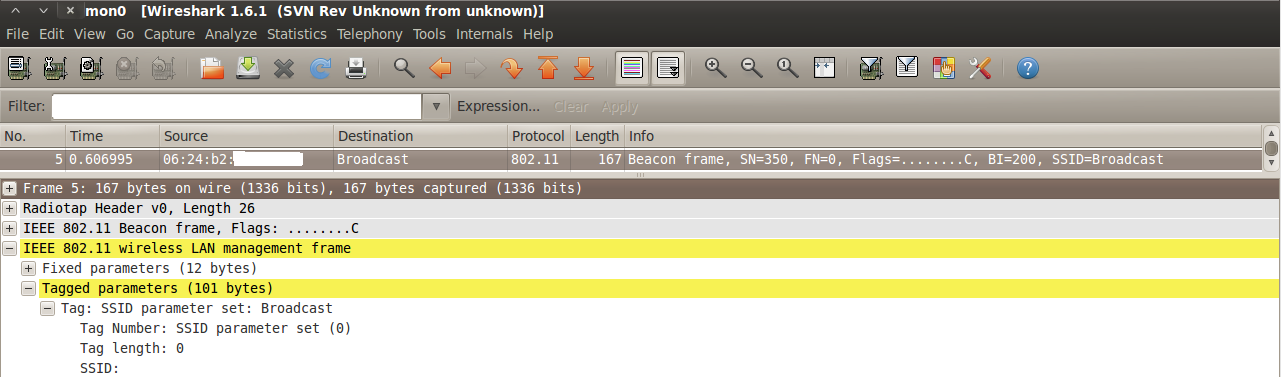
The AP still broadcasts Bacon frames, but without the SSID, so we see that something is there, but we don't know what. Here is how does it look in Wireshark and airodump-ng:


We can place our wifi card to monitor mode this way:

root@bt:~# airmon-ng start wlan0

This creates a mon0 interface which will belong to the wlan0 NIC, and we can't use wlan0 during this time. We can start monitoring with airodump-ng:

root@bt:~# airodump-ng mon0

We have two options:

1. We wait passively for a client to connect to the wireless network, cause then there will be a Probe request/response message exchange, where we will see the SSID in the response (this is the standard).

2. If we are inpatients, we can disconnect the clients with sending "deauth" packets with the AP's MAC address, thus causing them to reconnect, and we can reveal the SSID. Here it is:

root@bt:~# aireplay-ng -0 2 -a 06:24:B2:D8:3B:17 mon0

where:
-0 - deauth packet
2 - number of packets
-a - AP MAC address
and the interface.


The result: we get the SSID.


So it doesn't worth doing ourselves additional work with hiding the SSID.