Showing posts with label ipv6. Show all posts

Tuesday, February 14, 2012

IPv6 pentesting 7. - trace6

trace6 is a traceroute utility for IPv6. It can do TCP and ICMPv6 based trace, and we can also set the source address.

Basic usage:

trace6 interface destination-ip [port]

If we set the port number it will do a TCP trace, otherwise an ICMPv6.

Example:

trace6 eth0 3003::1 80

Sunday, February 12, 2012

IPv6 pentesting 6. - thcping6

With thcping6 we can carft a custom ICMPv6 packet, with being able to configure almost any field in the header, at least the most important ones.

I just did a simple example, without digging into too much:

thcping6 interface source-ipv6 destination-ipv6

IPv6 pentesting 5. - fake_router6

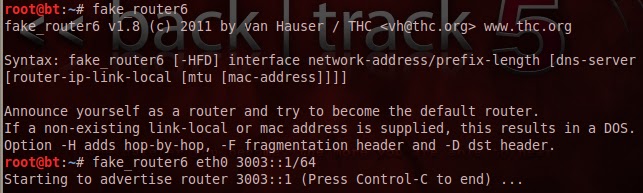
The fake_router6 tool sends RA (router advertisement) packets to the network with highest priority, thus claiming itself a router. It can achieve two things this way:
1. Set the machine as the default gateway, potentially allowing us to be MitM
2. If we give a non-existent link-local address, then it will be a DoS attack, as hosts will send the packets to a black hole
3. If we don't forward anything, only receive the packets as a DG, that is also a DoS

Simple usage:

fake_router6 interface address-prefix/prefix-length

eg.:

fake_router6 eth0 3003::1/64


After we start to advertise ourselves, the host receive it, and generates an address for itself:

IPv6 pentesting 4. - dos-new-ip6

This tool can be considered as a pair of detect-new-ip6. Similarly it listens for ICMPv6 DAD packets on the network, but if it sees one, it will send a response that this IPv6 address already exists, this way we can reach, that no host will be able to connect to the network - DoS attack.

If you are using BT5 64bit version, as myself, it won't work properly, along with detect-new-ipv6. I managed to get it work only if I started Wireshark, and a capture with it. Unfortunately also Wireshark didn't start properly:

wireshark: error while loading shared libraries: libwsutil.so.0: cannot open shared object file: No such file or director

The solution is:
1. Reinstall Wireshark
2. Copy files:

cp /usr/local/lib/libwsutil.so.1 /usr/lib/libwsutil.so.0
cp /usr/local/lib/libwiretap.so.1 /usr/lib/libwiretap.so.0

After that it works properly.

Usage of the tool is similar:

dos-new-ip6 interface
eg.:

dos-new-ip6 eth0


Part of the related Wireshark output:


And finaly the message on Windows 7, a successful DoS attack:


Update: On BT5 32bit version you also need to run Wireshark in order to get it worked. I suppose it starts a module or process, which the tool doesn't.


Friday, February 10, 2012

IPv6 pentesting 3. - alive6

The second tool from the package is alive6. This is actually scnas the network for active IPv6 addresses. It uses multiple packets for scnanning:
- ICMPv6
- IPv6 packet w/ unknown header
- IPv6 packet w/ unknown hop-by-hop options
(etc.)
we can set this with the "-s" option.
We can select from many options but the basic run is quite simple:
alive6 [interface]

Thursday, February 9, 2012

IPv6 pentesting 2. - detect-new-ip6

The tools found in thc-ipv6 package are located at the /usr/local/bin/ directory on BackTrack 5. The complete program listing and the package itself is available for download from here: http://thc.org/thc-ipv6/

The first tool I check is the "detect-new-ip6" tool. This is essentially detects the new hosts, which are connected to the network and continuously prints them to the screen. This is based on IPv6's DAD (Duplicate Address Detection) function. Each IPv6 host, when it connects to the network sends an ICMPv6 packet to a multicast address associated with its IPv6 address, and waits for a reply, with this verifying whether this address is already used by another device on the network or not. These messages are watched by the tool. The usage is very simple:

detect-new-ip6 eth0


IPv6 pentesting 1. - ping6

I'm starting a series about IPv6, since not much published about it. This is understandable, because it is still not as common, but it will not always be the case. I won't describe the IPv6 protocol, everyone can look after that.

There are not a lot IPv6 testing tools, the most widely used is the thc-ipv6 package, which contains a lot of different utilities. The goal is to go through them one by one. But before proceeding, let's look at how to ping IPv6, because the ping command does not work. What we need is a "ping6". Use it the same way as ping.

ping6 [ipv6 cím]